TL;DR

Get business pricing on garage and car supplies
- Business-only prices and quantity discounts
- Tax-exempt purchasing
- Multiple users, one account, clear invoices
The best Ford Transit remote work van setups balance a comfortable workspace with reliable power, internet, climate control, and room to sleep and move around. A swivel-seat station, fold-away desk, or dedicated desk can each work well; choose by measuring your specific Transit and matching the layout to your hours, equipment, and travel habits.
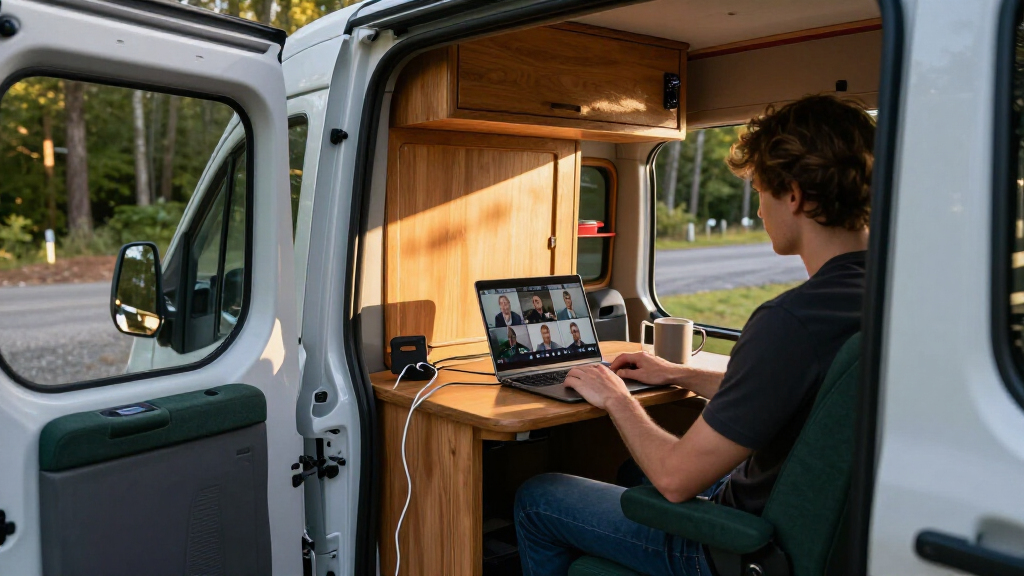
A video call can freeze at the worst moment: you’re parked beside a beautiful lake, your laptop battery flashes red, and the only outlet is across the van under a pile of bedding. A Ford Transit remote work setup works when the desk, power, internet, and living space are planned as one system.
This guide compares three useful layouts: a swivel-seat workstation, a fold-away desk, and a dedicated desk. You’ll also get a sample power budget, connectivity and climate advice, and a checklist for measuring your actual Transit before you buy materials or equipment.
The right build depends on your daily work, where you park, and whether the van also serves as your everyday vehicle. A Transit designed for remote work has to serve as both a reliable vehicle and a comfortable office, so start with what matters most: the way you’ll use it hour after hour.
Choose among swivel-seat, fold-away, and dedicated desks based on how long you work and what else the van must do.
Estimate power from device wattage and work hours; the sample laptop, monitor, router, and lights use about 352 watt-hours over four hours before losses.
Use coverage along your routes to choose between a hotspot, cellular router, multiple networks, or satellite service.
Measure the exact van configuration and account for payload before buying furniture, batteries, or water systems.
Test a desk mock-up, bed deployment, storage access, and daily-driver parking before making permanent changes.
Choose a Layout That Fits Your Workday
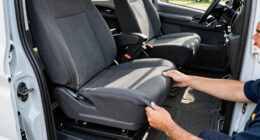
The best Ford Transit remote work van setups give you a usable desk without blocking the parts of the van you need for cooking, sleeping, and getting around. A swivel-seat workstation saves space, a fold-away desk changes the room quickly, and a dedicated desk makes long workdays easier. Pick the layout that fits your actual work schedule, not just the one that looks tidy in a photo.
Imagine starting a four-hour call-heavy morning in a parking lot, then moving to a trailhead for lunch. If you use a swivel-seat desk, you turn the passenger seat toward a compact table and keep the aisle open. If you choose a fold-away desk, you gain a wider work surface but need a safe place to stow it before driving. A fixed desk gives the steadiest work zone, though it claims permanent floor or wall space.
| Layout | Best fit | Main tradeoff |
|---|---|---|
| Swivel seat | Short sessions and compact builds | Seat comfort and desk reach vary |
| Fold-away desk | Mixed work and living space | Needs setup and secure storage |
| Dedicated desk | Frequent, longer workdays | Uses space even when you are off duty |
These are practical patterns, not fixed rules. A swivel passenger seat can work well for email and a laptop, except when you need a full-size monitor or several hours of posture support. Try a mock-up with a box or temporary table before cutting cabinetry. If your knees hit the bed frame or the screen catches glare at noon, the layout needs another pass.
As an affiliate, we earn on qualifying purchases.
Make Your Desk Comfortable for More Than an Hour
The best Ford Transit remote work van setups treat posture and screen placement as basic equipment, because a laptop balanced on your knees gets uncomfortable long before the workday ends. Set the screen near eye level, keep your hands relaxed at the keyboard, and choose a chair position that lets your feet rest naturally. A laptop stand, external keyboard, and mouse can make a small desk feel much more like an office.
Try this simple setup at home before building: put your laptop on a stack of books, attach a separate keyboard and mouse, and work for 30 minutes at the height you plan to use in the van. Notice whether you lean forward or lift your shoulders. For example, a remote designer who spends the morning reviewing layouts may need more depth for a mouse and sketchbook than someone who mainly answers email.
- Measure the seated position. Check seat height, legroom, desk height, and reach to the screen.
- Mock up the work surface. Use cardboard or a temporary table to check knee clearance and mouse space.
- Test your longest typical session. Work for at least an hour and adjust the screen, seat, and lighting.
- Secure loose gear. Give the keyboard, stand, and cables a home before the van moves.
A swivel seat can double as an office chair and save floor space, but it may not support every body well for a full day. If you work six hours most weekdays, test the seat for that kind of duration or plan a separate supportive chair. Small details matter: a mug should not crowd the mouse, and the desk should remain usable when the bed is deployed.
As an affiliate, we earn on qualifying purchases.
Build a Power System Around Your Actual Devices
The best Ford Transit remote work van setups size their power system around real device use, then leave room for conversion losses and other daily loads. Write down what you’ll run, how many hours you’ll run it, and whether each device uses USB, 12-volt DC, or household AC power. That simple inventory gives you a more useful starting point than choosing a battery because it looks large.
Consider a four-hour session with a laptop drawing an average of 45 watts, a small monitor drawing 30 watts, a router using 8 watts, and LED task lighting using 5 watts. That adds up to 88 watts per hour, or about 352 watt-hours over four hours, before losses, charging phones, or running a fan. Actual draw varies by device and workload, so check labels or measure your gear if you can.
A practical system often combines a house battery, alternator charging while driving, solar panels when conditions suit them, and an inverter for AC equipment. USB and 12-volt outlets can avoid some inverter overhead for compatible devices. Add a battery monitor so you can see what remains; without one, a laptop plugged in all afternoon can quietly turn a comfortable workday into a hunt for shore power.
For example, if you drive between work locations most days, alternator charging may contribute meaningfully to your routine. If you stay parked for several days under trees, solar may produce less than you hoped. Treat solar as a source that depends on sun, season, shade, and panel area, and size the system for your real pattern rather than the best-case sunny afternoon.
As an affiliate, we earn on qualifying purchases.
Choose Internet That Matches Your Routes
The best Ford Transit remote work van setups use an internet plan that matches where you actually travel, because a fast connection in town can disappear a few miles down a rural road. A phone hotspot is convenient and may be enough for occasional work; a dedicated cellular router can make daily connections and multiple devices easier to manage. In remote regions, satellite service may add coverage, with added power draw, setup needs, and expense.
Think through a Tuesday, not an ideal vacation day. If you take video calls from city lots and established campgrounds, one carrier may cover most of your route. If you cross rural areas or work from national forest edges, a second network can reduce the chance that one dead zone cancels a call. Coverage maps help with planning, but real terrain, buildings, and congestion affect performance.
A dedicated router can stay mounted and powered, while a hotspot keeps the kit simple and portable. Either way, put the device where its antennas can work, rather than burying it behind metal cabinets. Before a client call, test upload speed and audio from the exact parking location. A stable audio call often matters more than a headline download number.
For a remote-work van, connectivity is part of the workspace. Keep a short offline task list for stretches without signal, download documents before leaving town, and tell teammates when you expect to be reachable. Satellite internet can be helpful far from cellular service, but consider its energy use and clear-sky needs alongside the monthly plan and mounting setup.
As an affiliate, we earn on qualifying purchases.
Keep Your Van Usable in Heat, Cold, and Noise
The best Ford Transit remote work van setups manage light, temperature, and noise before they add more electronics. A bright task lamp helps you read notes; softer ambient lighting makes evenings easier on your eyes. Window coverings can cut glare and help with privacy, while ventilation helps move warm, stale air out of the cabin.
Picture a summer afternoon: the sun lands directly on your laptop screen, the van warms quickly, and a fan hums beside your microphone. A roof fan, cracked windows where safe, and reflective window shades can improve comfort, but parked conditions depend on climate and build quality. Insulation slows temperature changes; it does not create cooling on its own. Air conditioning can demand significant power, while heating may take fuel, space, and professional installation depending on the system.
For calls, placement matters. Mount a fan away from the microphone when possible, use curtains or soft surfaces to reduce echo, and park away from busy roads if the meeting needs clear audio. The gentle whirr of a fan may be fine for a casual team check-in, but traffic hiss and rattling cabinetry can make a client presentation hard to hear.
Start with simple measures: test the van at the hottest and coldest times you expect to work, note how quickly it changes temperature, and plan breaks or alternate work locations when conditions exceed your comfort. Do not idle the vehicle in an enclosed space. If you add fuel-burning heat or electrical climate equipment, have the installation and ventilation requirements checked by a qualified professional.
Measure Your Transit Before You Buy or Build
The best Ford Transit remote work van setups begin with measurements from the specific vehicle, because roof height, body length, wheelbase, drivetrain, and installed equipment affect both layout and payload. A high roof can make standing and moving around easier, while a longer body can offer more room for a desk and bed. Those gains come with tradeoffs in parking, maneuvering, and the amount of space you need at home.
Use this checklist before ordering furniture or cutting panels. Measure the interior at several points: curved walls and wheel wells mean a single width measurement can mislead you. For example, a desk that fits at shoulder height may collide with a window frame or narrow the aisle near the wheel arch.
- Record the exact model and configuration. Note model year, body length, roof height, wheelbase, and drivetrain.
- Measure working clearances. Check desk width and depth, seated legroom, aisle width, and the bed’s deployed footprint.
- Map doors and obstructions. Mark windows, wheel wells, pillars, sliding-door access, and existing equipment.
- Estimate added weight. Include batteries, cabinetry, water, tools, passengers, and stored work gear.
- Confirm vehicle limits. Check the specific Transit’s payload and dimensions in its documentation or with Ford or a dealer.
Longer and higher vans can make a full-time interior office more workable, but a smaller setup may suit a daily driver that needs to fit in garages or city parking. Model equipment and specifications vary by year and market, so verify the exact vehicle. Keep a margin in your weight plan; cabinetry, water, batteries, and passengers all count, even when each item seems modest on its own.
Organize Gear So You Can Start Work in Minutes
The best Ford Transit remote work van setups make work gear easy to reach and easy to put away, so your morning does not begin with ten minutes of untangling cables. Give chargers, adapters, headphones, documents, and small peripherals dedicated storage near the desk. A clear work surface reduces setup time and leaves space for notes, a mouse, or lunch when you are off the clock.
Imagine Maya, a project manager who works from her Transit three days a week. She keeps a small pouch with a USB-C charger, headset, and backup cable in the desk drawer, while a labeled bin holds paper files and a spare mouse. At the end of a call, she stows the laptop and closes the drawer; the table is ready for dinner instead of becoming a permanent pile of adapters.
Use soft bins or dividers to stop small items from clattering over rough roads. Secure the monitor and any heavier electronics before driving, and keep frequently used items within reach while parked. If you carry sensitive documents, lock them away when you leave the van. A tidy workspace also helps on video: a neutral curtain or organized shelf behind you looks calmer than a stack of laundry and a loose power strip.
Build the storage around your actual routine. Someone who makes video calls needs a reliable place for a headset and camera light; someone who edits photos may need a larger screen and a safe padded compartment. Keep the desk usable in both work and living modes, and check that drawers or cabinets do not block the sliding door or emergency exit routes.
Balance Work Space With Sleep, Cooking, and Daily Driving
The best Ford Transit remote work van setups reserve space for the whole day, because a desk that works beautifully at 10 a.m. can become an obstacle at dinner or bedtime. A convertible dinette or fold-away table lets one area serve several roles. A fixed desk with a separate bed can feel more like a small office, but it uses more of the van’s limited footprint.
For example, a couple traveling together may value a fixed sleeping area and a compact desk that folds against the wall. A solo worker who changes locations daily might prefer a swivel-seat setup that leaves the rear open for gear. If you also use the Transit as a daily driver, height and length affect parking garages, narrow streets, and the way the van handles in wind.
Think in routines: where do you place groceries when you return, where does wet gear dry, and can you leave the desk set up while the bed is ready? Modular furniture and removable desks have become common choices for people who want a van to switch between work, travel, and everyday use. Their flexibility comes with a little daily setup, so test whether you will actually put the pieces away each night.
Write down what matters most: uninterrupted work, standing room, a full bed, cooking space, or easy parking. Rank those needs, then sketch the van to scale. A Transit designed for remote work has to serve the workday and the hours around it. If the layout leaves no room to walk through with the bed deployed, the beautiful render is not the right build for your life.
Use a Simple Pre-Build Checklist to Avoid Costly Rework
The best Ford Transit remote work van setups are planned with a short checklist that catches fit and workflow problems before materials arrive. You do not need a perfect architectural drawing; you do need a clear picture of where you sit, plug in, store equipment, and sleep. A few careful mock-ups can save you from discovering that the desk blocks a cabinet or the monitor faces a window glare stripe.
Take a weekend and tape the proposed furniture footprint on the floor. Sit in the seat, open the sliding door, simulate the bed, and reach for the gear you use every morning. A real scenario helps: plug in your laptop, set up a video call, then try to make coffee without moving the desk. If the sequence feels awkward in an empty van, cabinetry will not fix it.
- Work pattern: list work hours, call frequency, devices, and need for privacy.
- Layout: test desk height, screen angle, seat comfort, aisle width, and bed access.
- Power: total device watt-hours and plan for charging, monitoring, and reserve.
- Internet: map regular routes and test coverage at likely work stops.
- Climate: plan shade, ventilation, insulation, and safe heating or cooling.
- Vehicle: confirm dimensions, payload, door clearance, and daily parking fit.
Keep a notebook with measurements and changes. If you switch from a 13-inch laptop to a monitor later, update the desk and power assumptions before installing permanent fittings. There is no universal best layout, but a repeatable checklist makes it easier to choose a setup that fits your specific work and Transit.
Frequently Asked Questions
Which Ford Transit roof height and length work best for remote work?
A high roof can make it easier to stand and move around, while a longer body gives you more layout choices for a desk and bed. The right combination depends on where you drive and park, how much workspace you need, and whether you use the van every day. Check the exact vehicle’s dimensions and payload before planning a build.
Can I work comfortably in a Transit without a permanent desk?
Yes. A swivel-seat table or fold-away desk can support laptop work while preserving room for living and storage. Test the setup for your longest typical work session, since a compact surface may feel fine for email but cramped for a monitor, mouse, and notes.
How much battery capacity do I need for a laptop, monitor, router, and lights?
Calculate each device’s average watts multiplied by the hours you use it, then add the totals and account for conversion losses and other loads. As an example, a 45-watt laptop, 30-watt monitor, 8-watt router, and 5-watt lights use about 352 watt-hours over four hours before losses. Your devices and workload may draw more or less.
Can solar panels keep a remote-work van powered?
Solar can contribute useful energy, but production changes with shade, season, weather, and panel area. If you drive regularly, alternator charging can add another source; a house battery stores energy for later use. Plan around your actual parking and travel routine, and use a battery monitor to track consumption.
Is a phone hotspot enough, or should I get a dedicated router?
A phone hotspot may be enough for occasional work in areas where your carrier has dependable coverage. A dedicated cellular router can simplify daily use and connect several devices, while a second carrier can help on varied routes. Test upload speed and call quality where you expect to work; satellite service is another option for remote areas, with extra power and setup needs.
Can a swivel passenger seat work as a full-time office chair?
It can save space and work well for shorter sessions, but comfort depends on your body, seat position, and desk height. Try a full work session before relying on it every day. If you work long hours, plan for better posture support or a separate chair.
Conclusion
Start with your workday, then build the van around it: choose a desk you can use comfortably, calculate the power your devices need, and plan internet and climate for the places you actually park. Measure your specific Transit and test the layout before committing to permanent furniture.
A good remote-work van should feel ready when the laptop opens and feel like home when the workday ends. Make that transition easy, and your desk becomes part of the journey instead of an obstacle in it.
Halloween Picks
halloween
As an affiliate, we earn on qualifying purchases.