
If your Milwaukee M18 charger is blinking red, it indicates a problem preventing proper charging. Understanding the causes and knowing how to troubleshoot can save you time and frustration. This guide provides practical, step-by-step instructions to identify and resolve common issues safely.

Get business pricing on garage and car supplies
- Business-only prices and quantity discounts
- Tax-exempt purchasing
- Multiple users, one account, clear invoices
Always follow safety precautions when working with power tools and batteries. If issues persist after troubleshooting, consult Milwaukee support or obtain professional assistance.
Key Takeaways
| Battery issues | A faulty or improperly seated battery can cause red blinking. |
| Charger problems | Dirty contacts or overheating may lead to charging errors. |
| Temperature concerns | Extreme cold or heat can trigger the red blinking warning. |
| Power source | Ensure the charger is connected to a reliable power outlet. |
Step 1: Check the Battery Seating and Condition
- Remove the battery from the charger and inspect for dirt, corrosion, or damage.
- Reinsert the battery firmly into the charger, ensuring proper contact.
- If the battery shows signs of damage or is old, consider replacing it with a new one, such as the Milwaukee 5.0 Ah XC Extended Capacity Resistant Battery.
Step 2: Inspect and Clean Charger Contacts
- Unplug the charger from the power outlet.
- Use a dry cloth or a soft brush to clean the metal contacts on both the charger and battery.
- Avoid using liquids or abrasive materials that could damage the contacts.
Step 3: Check for Overheating or Temperature Issues
If the charger feels hot, allow it to cool for at least 30 minutes before attempting to charge again. Ensure the charger is in a well-ventilated area and not exposed to direct sunlight or extreme cold.
Step 4: Verify Power Source and Connection
- Plug the charger directly into a known, functioning outlet.
- Avoid extension cords or power strips that may cause insufficient power supply.
- Test the outlet with another device to confirm it supplies stable power.
Additional Tips & Safety Warnings
- Use only genuine Milwaukee batteries and chargers to avoid compatibility issues.
- Never attempt to disassemble or modify the charger or batteries.
- If red blinking persists after troubleshooting, contact Milwaukee customer support for assistance.
The Products in This Guide
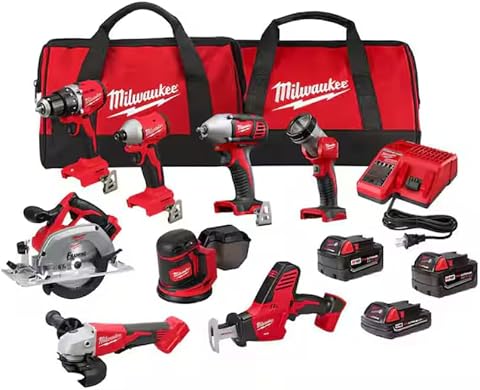
Milwaukee M18 18V Cordless Power Tool Combo Kit
- ✔ Battery Type: Lithium-ion
- ✔ Charger Type: Rapid charger
- ✔ Tool Count: 8
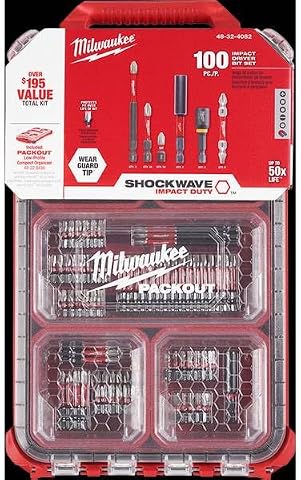
Milwaukee Shockwave 100pcs Impact Driver Bit Set Packout
- ✔ Number of bits: 100
- ✔ Storage: Packout case
- ✔ Material: Impact-rated steel
Milwaukee M18 18V Cordless Power Tool Combo Kit
The Milwaukee M18 18V Cordless Power Tool Combo Kit offers a comprehensive set of tools, batteries, and a charger designed for durability and performance. The charger included is built to handle various issues, but blinking red indicates a need for troubleshooting.
Pros:
- Includes 8 tools for versatile applications
- 3 high-capacity batteries for extended runtime
- Durable construction suitable for demanding jobs
- Two heavy-duty contractor bags for storage
Cons:
- Charger issues may require troubleshooting
- Battery aging can affect charging performance
- Requires careful handling to avoid damage
Best for: Construction, remodeling, and maintenance professionals
Not ideal for: Light-duty or occasional DIY projects
Bottom line: A versatile, reliable kit suitable for heavy-duty tasks with straightforward troubleshooting for charger issues.
Milwaukee Shockwave 100pcs Impact Driver Bit Set Packout
Enhance your Milwaukee toolkit with this 100-piece Impact Driver Bit Set, ideal for various applications and compatible with your cordless tools. It’s a practical addition if you’re troubleshooting or maintaining your tools.
Pros:
- Includes a wide variety of bits
- Durable impact-rated construction
- Packout case for organization
- Perfect for professional use
Cons:
- Set may be too extensive for basic users
- Some bits may not fit older impact drivers
- Requires proper storage to avoid loss
Best for: Professional contractors and enthusiasts needing versatile bits
Not ideal for: Complete beginners or light DIYers
Bottom line: A comprehensive set that complements your Milwaukee impact driver and enhances productivity.
Frequently Asked Questions
What does a blinking red light on my Milwaukee charger mean?
A blinking red light typically indicates a problem such as overheating, poor contact, or a faulty battery. Refer to the troubleshooting steps to identify the cause.
Can I use a different battery brand with my Milwaukee charger?
No. It’s recommended to use Milwaukee batteries and chargers together to ensure compatibility and safety.
How long does it take to fully charge the batteries?
Using the included rapid charger, most Milwaukee batteries can be charged in approximately 30-50 minutes, depending on the battery capacity.
What should I do if cleaning contacts doesn’t resolve the blinking red light?
If cleaning contacts doesn’t help, try cooling the charger, verifying the power source, or replacing the battery. Persistent issues may require professional support.
Keep Your Milwaukee Tools Charging Smoothly
By following these troubleshooting steps, you can often resolve the blinking red light on your Milwaukee charger and get back to work quickly. Always prioritize safety and use genuine parts for optimal performance. If problems persist, contact Milwaukee support for expert assistance.
Affiliate disclosure: As an Amazon Associate we earn from qualifying purchases. Prices and availability are accurate as of the time of publishing.
Halloween Picks

Spirit Halloween Scary Sitting Scarecrow Animatronic, 4 ft 6 in

ELAMAS 11ft Animatronic Flying Witch Halloween Decoration

Halloween Inflatable Haunted House Maze – 20×20 ft with Removable Roof and Blower
As an affiliate, we earn on qualifying purchases.