
Among these van backup cameras, I rank the Yakry Y14 Wired RV Backup Camera System as the best overall for its 7-inch 1080p monitor and wired setup, which suits drivers seeking a dedicated rear-view system. The ZEROXCLUB wired kit is a simpler license-plate option, while the Venluna 10.1-inch 4K touchscreen is the standout for buyers who want a larger, more advanced display. The main choice is between a stable wired connection and the easier installation of wireless or magnetic systems, with monitor size and night visibility also shaping the decision. Smaller-screen kits can save dashboard space, while mirror and touchscreen models offer different ways to view the rear. Read on for the full comparison and guidance on matching a camera to your van and driving needs.

Get business pricing on garage and car supplies
- Business-only prices and quantity discounts
- Tax-exempt purchasing
- Multiple users, one account, clear invoices
Complete the kit


Key Takeaways
- The Yakry Y14 leads as the most balanced dedicated system: its wired connection and 7-inch 1080p monitor make it a stronger all-around fit than compact-screen kits or feature-heavy mirror systems.
- Installation style is a major dividing line: wired kits such as the Yakry, eRapta, and FEISIKE suit buyers who can route a cable for a permanent setup; wireless and magnetic choices favor easier installation.
- Big screens are not automatically the best van fit: the Venluna 10.1-inch touchscreen and WOLFBOX G840S mirror display offer expansive viewing, but take more dashboard or mirror space than 4.3-inch and 4.6-inch options.
- Compact kits make a clearer tradeoff than a full monitor system: the YIMU K4302 and LeeKooLuu use 4.3-inch monitors, while the plug-and-play mirror camera uses a 4.6-inch display, making them appealing when cabin space matters.
- Specialized picks address specific constraints: the magnetic wireless model targets temporary or flexible mounting, the NATIKA supports front and rear viewing, and the WOLFBOX adds a mirror-dash-camera format rather than a conventional standalone monitor.
| Yakry Y14 Wired RV Backup Camera System with 7-Inch 1080p Monitor |  | Best for Long-Van Installs | Monitor: 7-inch IPS LCD | Video resolution: 1080p | Viewing angle: 150 degrees | VIEW LATEST PRICE | See Our Full Breakdown |
| ZEROXCLUB Wired License Plate Backup Camera with 7-Inch Monitor |  | Best for License-Plate Mounting | Screen size: 7 inches | Video capture resolution: 720p | Camera viewing angle: 170 degrees real angle; 149-degree field of view | VIEW LATEST PRICE | See Our Full Breakdown |
| HD 1080P 7-Inch Wireless Backup Camera System for Trucks |  | Best for Easier Installation | Monitor size: 7 inches | Resolution: HD 1080p | Connectivity: Wireless Bluetooth | VIEW LATEST PRICE | See Our Full Breakdown |
| eRapta 7-Inch HD Backup Camera Kit with Monitor |  | Best for Front-or-Rear Flexibility | Model: AY7 | Screen size: 7 inches | Video capture resolution: 1080p | VIEW LATEST PRICE | See Our Full Breakdown |
| Venluna 10.1-Inch 4K Touchscreen Wired RV Backup Camera System |  | Best for Full-Vehicle Coverage | Monitor: 10.1-inch 4K touchscreen | Camera resolution: 1080p | Camera count: 4 | VIEW LATEST PRICE | See Our Full Breakdown |
| Plug & Play Backup Camera with 4.6” Monitor, 12 LED HD Rearview Mirror Camera with Night Vision and 150° Wide Angle |  | Best for Simple 12V Setups | Monitor size: 4.6 inches | Compatibility: 12V cars and SUVs | Viewing angle: 150° | VIEW LATEST PRICE | See Our Full Breakdown |
| 1080p Wireless Magnetic Backup Camera with 7-Inch Monitor |  | Best for Temporary or Multi-Vehicle Use | Screen size: 7 inches | Video resolution: 1080p | Viewing angle: 170° | VIEW LATEST PRICE | See Our Full Breakdown |
| DALLUX 4-Pin Vehicle Backup Camera with 130° Wide View and Night Vision |  | Best Replacement Camera for Existing Systems | Model: HC5000 | Voltage: 12V | Image sensor: 1/3-inch CCD | VIEW LATEST PRICE | See Our Full Breakdown |
| 7.2″ 1440P HD Backup Camera for Truck & RV with 75FPS Zero-Lag View |  | Best for Smooth, Detailed Wired Viewing | Screen size: 7.2 inches | Resolution: 1440P HD | Frame rate: 75FPS | VIEW LATEST PRICE | See Our Full Breakdown |
| Vexelion 2K Backup Camera Kit with 7-Inch Monitor | 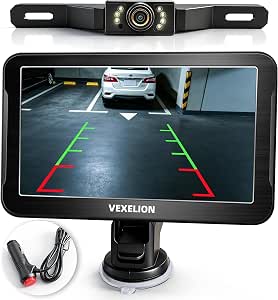 | Best for a DIY Wired Van Install | Screen size: 7 inches | Video resolution: 2K (1440p) | Field of view: 170° | VIEW LATEST PRICE | See Our Full Breakdown |
| YIMU K4302 Backup Camera System with 4.3″ Monitor, 150° Wide Angle, Night Vision, IP69K Waterproof |  | Best for Simple, Wide-Angle Coverage | Monitor size: 4.3 inches | Resolution: 720p | Field of view: 150 degrees | VIEW LATEST PRICE | See Our Full Breakdown |
| NATIKA Backup and Front View Camera |  | Best Compact Camera for Front-and-Rear Use | Video resolution: 720p | Image sensor: 1/2.7-inch CMOS | Viewing angle: 135° horizontal; specifications also list 160° real angle and 170° field of view | VIEW LATEST PRICE | See Our Full Breakdown |
| LeeKooLuu HD 1080P Backup Camera System with 4.3″ Monitor |  | Best Small-Screen HD Kit | Monitor size: 4.3 inches | Video resolution: 1080p | Field of view: 149 degrees | VIEW LATEST PRICE | See Our Full Breakdown |
| FEISIKE 7-Inch 1080p Wired Backup Camera with IR Night Vision |  | Best for a Large, Dedicated Monitor | Monitor size: 7 inches | Display technology: LCD IPS | Video resolution: 1080p | VIEW LATEST PRICE | See Our Full Breakdown |
| WOLFBOX G840S 12-Inch 4K Mirror Dash Cam with Backup Camera, 32GB Card, and GPS |  | Best Premium Mirror Dash Cam | Display size: 12 inches | Front camera resolution: 4K UHD (2160p) | Rear camera resolution: 1080p | VIEW LATEST PRICE | See Our Full Breakdown |
More Details on Our Top Picks
Yakry Y14 Wired RV Backup Camera System with 7-Inch 1080p Monitor
For a long van, the 66-foot wired connection is the main reason I rank the Yakry ahead of shorter-cable kits: it gives more room to route the lead from the rear camera to the cab, while avoiding wireless signal concerns. Its 7-inch IPS monitor, 1080p video, and 150-degree view make it a practical choice for checking the area behind a large vehicle. Infrared night vision and parking guidelines add useful reversing support, and a second camera input leaves room to expand coverage. Compared with the HD 1080P Wireless Backup Camera System, Yakry trades faster installation for a direct wired link. The cost of that stability is the cable run itself; it takes more installation work and needs a 12-volt power source. I’d skip it if avoiding wiring matters more than a fixed connection.
Pros:- 66-foot wired cable suits long vehicles and gives a direct camera-to-monitor connection.
- 7-inch IPS monitor displays 1080p video with a 150-degree viewing angle.
- Infrared night vision and parking guidelines support low-light reversing.
- Second camera input and image flipping allow a more flexible setup.
Cons:- Running the camera cable through a van can make installation time-consuming.
- Requires a 12-volt power source.
- The system’s wired setup is less convenient to move between vehicles than the wireless HD 1080P system.
Best for: Van and RV owners who need a long camera cable, a large monitor, and the option to add a second camera.
Not ideal for: Drivers who want a quick, wire-free setup or whose vehicle cannot provide the required 12-volt power.
- Monitor:7-inch IPS LCD
- Video resolution:1080p
- Viewing angle:150 degrees
- Connection:Wired
- Cable length:66 feet
- Night vision:Infrared
- Camera inputs:2
- Power:12 volts
Our verdict“Choose the Yakry if your van needs a long, stable wired connection and you’re willing to route the cable.”
ZEROXCLUB Wired License Plate Backup Camera with 7-Inch Monitor
The ZEROXCLUB is the most straightforward match here for a van owner who wants the camera mounted at the license plate rather than choosing a separate surface-mount location. Its 170-degree real viewing angle is broad, and the IP69K-rated camera is built for exposure to harsh weather. A 7-inch monitor gives a larger reversing image than compact-screen kits, while adjustable guidelines and image flip help tailor the view. Compared with the Yakry Y14, this package focuses on a license-plate installation and does not list a long 66-foot cable or a second camera input. Check the bracket dimensions and screw spacing before buying, especially if the van has a nonstandard plate mount. The system is wired, so routing the connection to the monitor is still part of the job.
Pros:- License-plate camera provides a direct mounting approach for compatible vehicles.
- 170-degree real angle of view gives broad rear coverage.
- IP69K-rated weather protection is suited to a camera exposed behind a van.
- Adjustable parking guidelines and image flip help adapt the displayed view.
Cons:- Wired installation requires routing cable through the vehicle.
- Bracket length and screw spacing may not fit every van’s plate mount.
- Video capture is listed as 720p, below the Yakry Y14’s 1080p specification.
Best for: Van owners with a standard U.S. license plate mount who want a broad rear view and a large monitor.
Not ideal for: Drivers with an unusual plate bracket, limited room for the 7-inch monitor, or a preference for wireless installation.
- Screen size:7 inches
- Video capture resolution:720p
- Camera viewing angle:170 degrees real angle; 149-degree field of view
- Night vision:6 LED lights
- Weather protection:IP69K-rated camera
- Connection:Wired, RCA connector
- Power:12 volts
- License plate bracket:9.84 inches long; 6.30-inch screw spacing
Our verdict“Pick the ZEROXCLUB if your van has a compatible standard plate mount and you prefer a wide, weather-protected wired camera.”
HD 1080P 7-Inch Wireless Backup Camera System for Trucks
If running a long video cable through a van is the part you want to avoid, this wireless system is the easier alternative to the Yakry Y14 and the wired ZEROXCLUB. It pairs a 7-inch 1080p monitor with a camera connection described as Bluetooth, plus a suction-cup monitor mount, so setup is less dependent on routing a camera cable to the cab. Night vision, adjustable parking lines, and support for two cameras with split-screen viewing give it more flexibility than a basic single-camera kit. The tradeoff is that wireless does not mean installation-free: the system still needs vehicle power, and the supplied details flag possible interference in complex electronic environments. I’d choose it for a simpler install, not for someone whose first priority is a hardwired signal path.
Pros:- Wireless camera connection reduces the need to route a video cable through the van.
- 7-inch 1080p monitor provides a large, detailed reversing image.
- Supports up to two cameras and split-screen viewing.
- Night vision, adjustable parking lines, and an IP69 waterproof rating suit varied reversing conditions.
Cons:- Still requires connections to vehicle power, such as reverse or running lights.
- Wireless performance may be affected by interference in complex electronic environments.
- Compared with the wired Yakry Y14, it does not provide the same direct wired camera-to-monitor link.
Best for: Van owners who want a large 1080p display and multi-camera capability without routing a video cable through the cabin.
Not ideal for: Drivers who prefer a wired camera link or need a setup with fewer potential wireless-interference concerns.
- Monitor size:7 inches
- Resolution:HD 1080p
- Connectivity:Wireless Bluetooth
- Camera support:Up to 2 cameras
- Display modes:Split-screen viewing
- Weather protection:IP69 waterproof rating
- Operating temperature:-22°F to 176°F
- Monitor mounting:Suction cup
Our verdict“Choose this system if reducing cable routing matters more than having a direct wired camera connection.”
eRapta 7-Inch HD Backup Camera Kit with Monitor
The eRapta AY7 earns its place for van owners who may want a camera at the front as well as the rear: its camera is described for front or rear viewing, and the kit includes two brackets and a 33-foot cable. A 7-inch monitor, 1080p video, night-vision LEDs, and IP69K housing cover the core needs for a practical van backup setup. Compared with ZEROXCLUB’s license-plate camera, eRapta offers more placement flexibility, but its listed real viewing angle is narrower at 140 degrees versus ZEROXCLUB’s 170 degrees. It also uses a 4-pin Mini DIN connection, so compatibility and cable routing deserve a check before installation. The monitor and camera need mounting, and the system requires 12-volt vehicle power; it is not the choice for someone seeking a wireless setup.
Pros:- Camera can be used for front or rear viewing.
- Includes a 7-inch monitor, two mounting brackets, and a 33-foot cable.
- IP69K camera housing and 9 LED lights support use in wet and low-light conditions.
- Adjustable display settings and DIY reversing lines allow some setup customization.
Cons:- 140-degree real viewing angle is narrower than the ZEROXCLUB’s listed 170-degree real angle.
- Requires a 12-volt power source and physical installation of the monitor and camera.
- 4-pin Mini DIN connection may limit compatibility with other camera equipment.
Best for: Van owners who want one camera kit that can be positioned for rear reversing or front visibility.
Not ideal for: Drivers who need the broadest listed viewing angle or want to avoid mounting hardware and wired installation.
- Model:AY7
- Screen size:7 inches
- Video capture resolution:1080p
- Real viewing angle:140 degrees
- Field of view:149 degrees
- Night vision:9 LED lights
- Connection:4-pin Mini DIN
- Included cable:33-foot power cable
Our verdict“Choose the eRapta if you want a wired camera that can serve at either end of the van, rather than the widest rear-only view.”
Venluna 10.1-Inch 4K Touchscreen Wired RV Backup Camera System
For a van or converted RV where one rear camera leaves too much unseen, Venluna’s four-camera setup is the clear step up from the single-camera Yakry Y14 and eRapta AY7. It supports simultaneous DVR recording and selectable one-, two-, three-, or four-channel views, making it better suited to monitoring multiple sides than simply watching the rear while reversing. The 10.1-inch 4K touchscreen also gives more screen area than the 7-inch systems in this roundup, while Bluetooth calling and USB playback add extra functions. Those additions bring a more involved installation: the cameras are wired, and the monitor needs cigarette-lighter power. The listed camera resolution is 1080p, so the 4K figure applies to the monitor, not each camera. I’d skip it if a basic rear view is all you need.
Pros:- Four cameras support broader vehicle coverage than the single-camera Yakry and eRapta systems.
- DVR records simultaneously, with local playback and loop recording.
- Selectable one-, two-, three-, and four-channel display modes support different viewing needs.
- 10.1-inch touchscreen adds more viewing area than the roundup’s 7-inch monitors.
Cons:- Wired camera connections require installation work across the vehicle.
- Monitor requires cigarette-lighter power.
- The monitor is 4K, but the cameras are specified at 1080p.
Best for: Van, bus, or RV owners who want simultaneous coverage from multiple camera positions and local recording.
Not ideal for: Drivers seeking a simple single-camera reversing kit, a compact monitor, or a wireless camera installation.
- Monitor:10.1-inch 4K touchscreen
- Camera resolution:1080p
- Camera count:4
- Connection:Wired cameras
- Display modes:1, 2, 3, or 4 channels
- Recording:DVR with local playback and loop recording
- Connectivity:Bluetooth 5.0 and USB 2.0
- Operating temperature:-32°F to 187°F
Our verdict“Pick Venluna when multi-angle monitoring and recording matter more than a simple, quick-to-install rear camera.”
Plug & Play Backup Camera with 4.6” Monitor, 12 LED HD Rearview Mirror Camera with Night Vision and 150° Wide Angle
For a van owner who wants a basic wired view without a separate dashboard monitor, this 4.6-inch display and license-plate camera make a straightforward pairing. Its cigarette-lighter power and 12 LED night vision keep the setup approachable, while the wired feed avoids the signal delays that can affect wireless systems. Compared with the 7-inch display on the 1080p Wireless Magnetic Backup Camera, this screen takes up less space but gives you a smaller image to judge distance. The 150° view and dynamic reverse guides help when backing into a space, though the product data lists compatibility with 12V cars and SUVs—not 24V vehicles or vans. I’d skip it for a van unless its electrical and vehicle compatibility are confirmed. A 23-foot cable also means routing work, and mounting screws are not included.
Pros:- Cigarette-lighter power supports a plug-and-play-style setup.
- Wired video avoids wireless signal interference and delay.
- Twelve LED lights support visibility in low light.
- 150° viewing angle and dynamic reverse guides aid parking.
Cons:- Listed compatibility excludes vans and 24V trucks.
- The 4.6-inch monitor is smaller than the 7-inch options in this roundup.
- The 23-foot cable must be routed, and mounting screws are not included.
Best for: Drivers of compatible 12V cars or SUVs who want a compact, wired reverse camera powered through a cigarette lighter.
Not ideal for: Van and 24V truck owners, or anyone who wants a larger screen or wants to avoid routing a 23-foot cable.
- Monitor size:4.6 inches
- Compatibility:12V cars and SUVs
- Viewing angle:150°
- Night vision:12 LED lights
- Connection:Wired
- Power cord length:23 feet
- Camera mounting location:Rear license plate area
Our verdict“Choose this for a compatible 12V car or SUV if you want a compact wired system, but verify vehicle fit before considering it for a van.”
1080p Wireless Magnetic Backup Camera with 7-Inch Monitor
The magnetic camera mount is the defining advantage here: it can be attached without running a video cable through a van, then moved to another suitable metal surface when needed. That makes this a more flexible choice than the permanently wired Vexelion 2K Backup Camera Kit, though the Vexelion avoids battery charging and offers a wired signal. This model pairs 1080p video and a 170° view with a roomy 7-inch monitor, useful when a small screen makes reversing a loaded van harder to judge. Its rechargeable battery, solar charging support, and IP69 rating suit occasional use outdoors, but the wireless range is limited to 33 feet and the monitor still needs cigarette-lighter or USB power. I’d check the distance between camera and screen, plus the mounting surface, before choosing it for a long van.
Pros:- Magnetic camera mount avoids routing a video cable and makes relocation easier.
- Seven-inch monitor and 170° view give a broad, easy-to-see rear image.
- Rechargeable 15,000 mAh battery has solar charging support.
- IP69 waterproof rating and support for a second camera add flexibility.
Cons:- Wireless transmission is specified for distances up to 33 feet.
- The monitor needs a cigarette-lighter or USB power source.
- The camera battery requires charging, and the magnetic mount needs a suitable surface.
Best for: Van, trailer, camper, or pickup owners who need a removable camera that can move between vehicles and have a suitable magnetic mounting surface.
Not ideal for: Drivers whose camera-to-monitor distance exceeds 33 feet, who lack a metal mounting point, or who want a permanently powered system without battery upkeep.
- Screen size:7 inches
- Video resolution:1080p
- Viewing angle:170°
- Battery capacity:15,000 mAh
- Solar panel:5W
- Wireless transmission distance:Up to 33 feet
- Camera mounting:Magnetic
- Compatible vehicles:Most trucks, pickups, cars, small RVs, trailers, and campers
Our verdict“Pick this for removable, cross-vehicle use when its 33-foot wireless range and battery-powered camera suit your van setup.”
DALLUX 4-Pin Vehicle Backup Camera with 130° Wide View and Night Vision
This DALLUX is a camera-only replacement, not a complete kit, so it suits a van owner who already has a compatible 4-pin monitor and cable. Its zinc-metal housing, IP69K rating, and stated 50-foot infrared night vision make it a more rugged camera option than the all-in-one Plug & Play Backup Camera with 4.6” Monitor. The tradeoff is that the DALLUX provides no screen or extension cable, and its 4-pin connector must match the existing system; connector fit should be checked rather than assumed. The 130° view is narrower than the 150° or 170° views listed for several complete systems, but a rotatable surface-mount bracket allows flexible positioning. I’d choose it to replace a failed camera on a compatible setup, not to build a van camera system from scratch.
Pros:- IP69K-rated zinc-metal housing is suited to exposed vehicle mounting.
- Infrared night vision is specified up to 50 feet.
- Rotatable surface-mount bracket allows top or bottom installation.
- 130° viewing angle provides a useful rearward view.
Cons:- Monitor and extension cable are not included.
- Requires a compatible 4-pin monitor connection.
- Its 130° view is narrower than the 150° and 170° alternatives in this batch.
Best for: Van, bus, truck, or RV owners replacing a camera on an existing 12V system with a confirmed compatible 4-pin monitor.
Not ideal for: First-time buyers who need a monitor, extension cable, or a complete plug-and-play camera kit.
- Model:HC5000
- Voltage:12V
- Image sensor:1/3-inch CCD
- Resolution:976 × 576 pixels; 800 TVL
- Viewing angle:130°
- Night vision range:Up to 50 feet
- Connector:4-pin video connector
- Housing:Zinc metal; IP69K-rated
- Included items:One camera; extension cable not included
Our verdict“Choose the DALLUX as a rugged replacement camera only if your van already has a compatible 4-pin monitor and cable.”
7.2″ 1440P HD Backup Camera for Truck & RV with 75FPS Zero-Lag View
Among these van-oriented choices, this system pairs a 7.2-inch screen with 1440P resolution and a 75FPS feed, aiming for a larger, smoother image than the more compact Plug & Play Backup Camera with 4.6” Monitor. That can help when checking a long vehicle’s rear area while reversing, and the 150° lens with distortion correction balances coverage with a less warped view. Its IP69K all-metal housing and stated operating range from -22°F to 176°F also favor exposed truck, RV, or van use. The tradeoff is a wired AHD/LVDS coaxial connection: installation is less flexible than the wireless magnetic system, and compatibility with the vehicle’s power and display setup should be confirmed. The supplied data describes an included 66-foot cable and mounting hardware, but the listed specs do not detail every vehicle connection requirement.
Pros:- 1440P resolution and 75FPS support a detailed, smooth live view.
- Seven-point-two-inch display is larger than the 4.6-inch option in this batch.
- 150° lens includes distortion correction.
- IP69K all-metal housing and a broad stated operating-temperature range suit demanding conditions.
Cons:- Wired installation requires routing a cable from the rear of the vehicle.
- Requires a 12V power source, limiting fit with non-standard electrical systems.
- AHD/LVDS coaxial connection may require compatibility checks before purchase.
Best for: Van, truck, and RV drivers who prioritize a large, high-detail wired image and want a camera system specified for harsh weather.
Not ideal for: Owners seeking a cable-free installation or those who cannot confirm compatibility with the system’s 12V power and AHD/LVDS connection.
- Screen size:7.2 inches
- Resolution:1440P HD
- Frame rate:75FPS
- Night vision range:33 feet
- Field of view:150°
- Connector type:Wired AHD/LVDS coaxial
- Operating temperature:-22°F to 176°F
- Housing:IP69K-rated all-metal
- Warranty:36 months
Our verdict“Choose this for a van or RV if you want a large, smooth wired image and can confirm the 12V and connection requirements.”
Vexelion 2K Backup Camera Kit with 7-Inch Monitor
The Vexelion is a complete wired kit aimed at buyers who want a 7-inch monitor and a high-resolution view without relying on wireless transmission. Its 2K (1440p) resolution and 170° field of view give it broader stated coverage than the 7.2" 1440P HD Backup Camera for Truck & RV, while the Vexelion’s smaller screen may be easier to place in a crowded dashboard. Wired video sidesteps the range limit of the 1080p Wireless Magnetic Backup Camera, but it brings the familiar installation burden: routing a cable from rear to front. The listing describes DIY installation in 15 minutes, though actual fit depends on the vehicle and cable path. IP69K protection supports exterior use, but the supplied specs don’t state a cable length or night-vision range, so van owners should verify those details before purchase.
Pros:- 2K (1440p) resolution is paired with a 7-inch monitor.
- 170° field of view is wider than the 150° view listed for the 7.2-inch system.
- Wired transmission avoids wireless range limits and signal interference.
- IP69K waterproofing and listed compatibility with vans, trucks, cars, SUVs, and RVs.
Cons:- Wired installation requires running a cable from the rear to the dashboard.
- The supplied specifications do not state cable length or night-vision range.
- The 15-minute installation claim may not reflect the cable-routing work in every van.
Best for: DIY-minded van, truck, SUV, or RV owners who want a wired 2K system and can route a rear-to-dashboard cable.
Not ideal for: Drivers who need wireless installation, detailed cable-length information, or a documented night-vision range before selecting a system.
- Screen size:7 inches
- Video resolution:2K (1440p)
- Field of view:170°
- Connection type:Wired; RCA and power connector
- Installation type:DIY, wired
- Compatible vehicles:Cars, trucks, SUVs, RVs, and vans
- Dimensions:7 × 7 × 4.5 inches
Our verdict“Pick the Vexelion for a broad-view, wired 2K setup if you’re comfortable routing a cable and can confirm the missing fit details.”
YIMU K4302 Backup Camera System with 4.3″ Monitor, 150° Wide Angle, Night Vision, IP69K Waterproof
The YIMU K4302 is a practical fit for van owners who want a dedicated reversing view without a large display or a complex setup. Its 150° field of view helps show more of the area behind the vehicle, while the 4.3-inch monitor keeps the dash footprint modest. The supplied mounting options, including a license plate bracket, give it more placement flexibility than a camera-only option such as the NATIKA Backup and Front View Camera, which needs a compatible screen or head unit.
The tradeoff is the wired connection: it avoids relying on a wireless link, but routing cable takes more effort, and the monitor may need cigarette-lighter or USB power if it is not connected to the reverse lights. I’d choose it for straightforward rear coverage, not for drivers who want a large screen or front-camera switching.
Pros:- 150° viewing angle covers a broad area behind the van.
- IP69K rating suits exposure to harsh weather and washing.
- Includes license plate and alternative mounting brackets.
- Plug-and-play design is intended to simplify installation.
Cons:- Wired installation requires routing a cable between camera and monitor.
- Monitor power may depend on a cigarette lighter or USB connection if not hardwired to reverse lights.
- The 4.3-inch screen provides less viewing area than the FEISIKE 7-inch monitor.
Best for: Van owners who want a dedicated, wide-angle rear view and prefer a compact monitor with flexible mounting options.
Not ideal for: Drivers who want a large display, front-view camera modes, or an installation without routing a cable through the vehicle.
- Monitor size:4.3 inches
- Resolution:720p
- Field of view:150 degrees
- Power:12V DC
- Connector:RCA
- Warranty:2 years
Our verdict“Choose the YIMU K4302 if you want broad rear coverage and a compact dedicated display, and can accept a wired install.”
NATIKA Backup and Front View Camera
Unlike complete kits such as the YIMU K4302, the NATIKA is a compact camera meant to work with a compatible display or head unit. That makes it a useful choice for van owners who already have a screen and want one camera that can switch between backup and front-view modes. Its metal housing, small dimensions, and 12–24V compatibility also suit a range of vehicle setups, including larger vans and RVs.
The camera’s switchable guidelines let buyers tailor the image for their preferred use, but changing settings may require cutting a wire loop. Factory-screen installations can also call for a separate harness, so this is less plug-and-play than the YIMU or the complete LeeKooLuu system. I’d skip it if you need a monitor included or want to avoid wiring decisions during installation.
Pros:- Switches between backup and front-view use.
- Compact metal housing supports flexible placement.
- IP69K waterproof construction is suited to exposed mounting.
- Guidelines can be switched on or off.
Cons:- Does not include a monitor, so compatibility with an existing screen matters.
- A separate harness may be needed for factory displays.
- Changing view or guideline settings may require cutting a wire loop.
Best for: Van owners with a compatible factory or aftermarket screen who want a small camera that can serve both front and rear viewing needs.
Not ideal for: Buyers seeking a complete camera-and-monitor kit or a simple installation that does not involve a separate harness or wire-loop changes.
- Video resolution:720p
- Image sensor:1/2.7-inch CMOS
- Viewing angle:135° horizontal; specifications also list 160° real angle and 170° field of view
- Voltage:12–24V
- Connector:RCA
- Housing:Metal, IP69K waterproof
- Mounting:Vertical or horizontal
- Warranty:24-month replacement warranty
Our verdict“Pick the NATIKA if your van already has a compatible display and you value a compact camera with front-and-rear modes.”
LeeKooLuu HD 1080P Backup Camera System with 4.3″ Monitor
The LeeKooLuu combines a 1080p camera and a 4.3-inch monitor in one wired kit, making it a stronger fit for buyers who want a complete system but do not want a large dash display. Compared with the 720p YIMU K4302, its stated camera resolution is higher; the YIMU, however, lists a slightly wider 150° view versus LeeKooLuu’s 149°. The difference is small, so the more useful distinction is the LeeKooLuu’s emphasis on image detail in a compact-screen package.
Its adjustable parking lines, night vision, and stated operating range from -22°F to 176°F suit changing conditions. The tradeoff is screen size: the FEISIKE’s 7-inch monitor is easier to view at a glance, while this one takes less space. The wired setup also means cable routing and a power connection still need planning.
Pros:- 1080p camera resolution is higher than the 720p listed for the YIMU K4302.
- Includes both a 4.3-inch LCD monitor and camera.
- Adjustable parking grid lines can be tailored to the vehicle.
- Rated operating temperature spans -22°F to 176°F.
Cons:- The 4.3-inch display is smaller than the FEISIKE’s 7-inch monitor.
- Wired installation requires cable routing.
- Monitor power requires access to a cigarette lighter or reversing-light circuit.
Best for: Van owners who want a complete wired kit with a compact monitor and prioritize stated 1080p camera resolution over a larger display.
Not ideal for: Drivers who need a large screen for quick glance viewing or want to avoid running wires and connecting monitor power.
- Monitor size:4.3 inches
- Video resolution:1080p
- Field of view:149 degrees
- Voltage:12 volts
- Connector:4-pin
- Display technology:LCD
- Operating temperature:-22°F to 176°F
- Installation:Surface-mount camera; dashboard-mount display
Our verdict“Choose LeeKooLuu if you want a complete compact-screen kit with stated 1080p resolution, rather than a larger monitor.”
FEISIKE 7-Inch 1080p Wired Backup Camera with IR Night Vision
For van drivers who find a 4.3-inch screen too small to check comfortably, the FEISIKE’s 7-inch IPS monitor is the main reason to choose it. It pairs that larger display with a 1080p camera, a 150° view, and infrared night vision. Against the LeeKooLuu, it offers more screen area for a quick glance; against the WOLFBOX G840S, it is a simpler reversing system rather than a mirror dash cam with recording, GPS, and app connectivity.
The adjustable parking guidelines and image flip give some flexibility for installation and viewing, while the IP68 camera is designed for varied weather. Its costs in convenience are physical: the wired connection needs routing, and the monitor draws power through a cigarette-lighter adapter. Buyers wanting a small, discreet setup may prefer the YIMU’s 4.3-inch display.
Pros:- 7-inch IPS monitor offers more viewing area than the 4.3-inch LeeKooLuu and YIMU displays.
- 150° camera field of view helps show a broad area behind the van.
- Infrared night vision supports use in dark conditions.
- Adjustable guidelines and image flip allow setup customization.
Cons:- Wired installation requires routing a connection through the vehicle.
- Monitor power depends on a cigarette-lighter adapter.
- IP68 rating is below the IP69K ratings listed for the YIMU and NATIKA.
Best for: Van drivers who want a dedicated, easy-to-see reversing display and value a larger screen over a compact dash setup.
Not ideal for: Drivers who prefer a small monitor, a wireless setup, or a dash-camera system with GPS and recording features.
- Monitor size:7 inches
- Display technology:LCD IPS
- Video resolution:1080p
- Camera field of view:150 degrees
- Night vision:Infrared
- Voltage:12 volts
- Warranty:1 year
Our verdict“Choose the FEISIKE if a large dedicated screen matters more to you than wireless convenience or dash-camera features.”
WOLFBOX G840S 12-Inch 4K Mirror Dash Cam with Backup Camera, 32GB Card, and GPS
The WOLFBOX G840S takes a different approach from the dedicated reversing kits here: its 12-inch mirror display combines a backup-camera view with dash-camera functions. A 4K front camera, 1080p rear camera, GPS, Wi-Fi, and included 32GB card make it a more capable recording setup than the FEISIKE, which focuses on displaying a rear view while reversing. Its large screen and 140° rear lens field of view are aimed at drivers who want more than parking assistance from their van camera system.
That expanded feature set brings extra setup needs. The 24-hour parking monitor requires a hardwire kit, and the product description recommends original-brand accessories. Compared with the YIMU K4302, this is not the simpler choice for a dedicated reversing screen; it makes more sense if recording and GPS are part of the buying brief.
Pros:- 12-inch mirror display provides substantially more screen area than the dedicated 4.3-inch kits.
- 4K UHD front camera and 1080p rear camera add recording capability.
- GPS antenna and 5.8 GHz Wi-Fi support location data and app connectivity.
- Includes a 32GB storage card and supports time-lapse parking monitoring.
Cons:- 24-hour parking monitoring requires a separate hardwire kit.
- More functions and connections make setup less simple than the YIMU K4302.
- The description recommends original-brand accessories.
Best for: Van owners who want a mirror-mounted reversing display alongside front-and-rear dash recording, GPS, and Wi-Fi features.
Not ideal for: Buyers who only need a straightforward reversing camera or do not want to source a hardwire kit for parking monitoring.
- Display size:12 inches
- Front camera resolution:4K UHD (2160p)
- Rear camera resolution:1080p
- Front lens field of view:170 degrees
- Rear lens field of view:140 degrees
- Connectivity:5.8 GHz Wi-Fi
- GPS:External GPS antenna included
- Parking monitor:24-hour monitoring; hardwire kit required
- Storage card:32GB included
Our verdict“Choose the WOLFBOX G840S if you want a mirror dash cam with reversing assistance, recording, and GPS rather than a basic backup-camera kit.”

How We Picked
I ranked these van backup cameras by how well each setup addresses the practical demands of reversing a larger vehicle: a view that is easy to read, a monitor suited to the cabin, and a connection and mounting approach that fits the van. I also weighed stated image resolution, night-vision features, viewing angle, weather protection where listed, and whether the system is intended for a permanent installation or a more flexible setup. A useful specification matters most when it solves a real van-driving problem, rather than simply adding complexity.
The order favors balanced, dedicated rear-view systems ahead of products built for narrower needs. Wired kits score well for a permanent camera-to-monitor link, while wireless and magnetic options can make installation easier but may involve different connection and mounting tradeoffs. Large-screen 4K models rank higher for buyers who value expansive displays and extra features, but not automatically above simpler systems that may be easier to fit. Compact monitors, camera-only options, and mirror-style systems remain in the roundup for their distinct uses, though each asks buyers to accept a more specific compromise.
Factors to Consider When Choosing Van Backup Cameras
Before choosing, match the camera system to how your van is built and used, not just the headline resolution. These broader checks can help prevent a common mismatch: buying a capable camera whose wiring, mounting, or display does not suit the vehicle.
Choose Wired or Wireless Around the Installation
A wired system can make sense when you want a permanent camera and monitor connection and are comfortable routing cable through a long vehicle. The tradeoff is installation work: vans may have interior panels, cargo fittings, or bodywork that make cable routing harder than it appears. Wireless systems can reduce that work, but buyers should check how the camera and monitor receive power and whether the signal setup suits their vehicle. A magnetic camera can be especially convenient for temporary use, yet its mounting method may not match every van body or work routine. Avoid choosing on the word “wireless” alone; confirm what still needs wiring before buying.
Match the Monitor to Your Cab
A larger display can make the rear image easier to inspect, but it also occupies more dashboard space and may interfere with sightlines or existing controls. Small monitors are less intrusive, though fine details can be harder to distinguish at a glance. Mirror-style displays offer a different placement, but they change how the driver uses the rear-view mirror and may suit some interiors better than others. Before selecting a screen, check available mounting space and where the image will sit in your normal driving position. Do not assume a bigger screen will be useful if it ends up awkwardly placed.
Read Resolution Alongside Frame Rate and Viewing Angle
Resolution describes image detail, but it is only one part of a useful reversing view. A high-resolution display has limited value if the camera angle leaves blind areas or the image is difficult to interpret while moving. A wider view can show more of the area behind the van, though it may make distant objects look smaller. Frame rate is another useful distinction for drivers who want a smoother view while backing up. Compare the whole viewing setup instead of treating a single number as proof that one camera will be clearer in every situation.
Plan for Night Driving and Weather Exposure
Night-vision or infrared features matter most if you reverse in dim yards, unlit parking areas, or early-morning work sites. Their presence does not remove the need to check whether the camera placement and image remain useful in your conditions. A rear camera also faces road spray, dirt, and weather, so look for a stated waterproof rating when the camera will be exposed. Ratings and night-vision labels are not substitutes for correct mounting or regular cleaning. A common mistake is focusing on a display’s resolution while overlooking the conditions the camera itself must handle.
Check Camera Compatibility Before Buying
Not every camera is a complete system: some listings describe a camera with a monitor, while others are camera-only or designed to connect with a compatible display. Check the connector type, monitor compatibility, power requirements, and whether the system includes the parts needed for your intended setup. This matters especially when replacing an existing camera or adding a front-view camera, since a connector that looks similar may not work with the current equipment. Do not count on a product being plug-and-play without confirming what it plugs into. A little compatibility checking can prevent buying a second monitor or a camera that cannot connect to your van’s setup.
Pay for Features You Will Actually Use
Touchscreens, very large displays, 4K recording or viewing claims, GPS, and dash-camera functions can add value when you want more than a basic reversing view. They can also bring extra setup steps, dashboard footprint, or features that are unnecessary for a driver who only needs help backing into a loading space. A simpler dedicated kit may be a better fit for a work van than an all-in-one mirror system. On the other hand, a multi-use display can be worthwhile if you want front and rear views or dash-camera functions in the same device. Decide which jobs the system must perform, then treat the rest as optional rather than automatic upgrades.
Frequently Asked Questions
Should I choose a wired or wireless backup camera for a van?
Choose wired if you want a permanent setup and can route a cable through the van; it avoids relying on a wireless link between the camera and monitor. Choose wireless when reducing cable routing is a higher priority, but check how each part gets power and what the installation still involves. Magnetic systems can suit temporary mounting, though they are not a universal match for every van body or use pattern. For a work vehicle used daily, weigh installation effort against how secure and repeatable you need the setup to be. The right choice depends on the van’s layout and your tolerance for installation work, not the connection label alone.
Is a 4.3-inch monitor large enough for a van?
A 4.3-inch monitor can work if you want a compact display that takes up little cabin space and mainly need a reversing aid. It gives you less screen area than the 7-inch kits or the 10.1-inch Venluna, so the image may be less comfortable to inspect at a glance. Consider how far the screen will sit from your driving position and whether you reverse in tight spaces where detail matters. A smaller display may also be easier to fit around existing dash controls. If you have room and prefer a more prominent view, a larger monitor is the clearer alternative.
Do I need a 4K camera system for reversing a van?
Not necessarily: a 4K system is most compelling if you also want a large display or added functions, rather than for resolution alone. The Venluna and WOLFBOX use 4K in distinct formats, but a dedicated 1080p setup may be a more straightforward fit for drivers who only need a rear view. Camera angle, screen placement, and night visibility all shape how useful the image is. Check which parts of the system the resolution refers to and what the monitor can display. Choose 4K when its broader feature set suits your use, not simply because the number is higher.
Can I use a backup camera system for both front and rear views?
Some systems support more than one viewing direction, but do not assume a rear camera kit can simply be turned around or connected to another camera. The NATIKA is specifically listed as a backup and front-view camera, making it the clearest fit in this roundup for buyers seeking both angles. Check whether the monitor supports multiple camera inputs and how the driver selects each view. Front-camera placement and viewing angle may differ from rear-camera needs, so confirm the intended mounting use. If you only need reversing assistance, a dedicated rear setup may be simpler.
What should I check before fitting a backup camera to a van?
Start with the camera’s mounting location, the route for power and video cables, and the monitor’s position in the cab. Check compatibility with any existing display or connector if you plan to replace or expand a system. For an exposed mount, look for stated weather protection and think about how easy the lens will be to clean. Also confirm what the package includes, since camera-only products may need a separate compatible monitor. Planning those details first can help avoid a system that has suitable features but does not fit your vehicle.
Conclusion
For most drivers who want a dedicated, balanced van setup, I recommend the Yakry Y14 as best overall. The ZEROXCLUB wired license-plate kit is my best value-style choice for buyers who prefer a straightforward wired configuration, while the Venluna 10.1-inch 4K touchscreen is the best premium pick for a large display and a more feature-forward system. Beginners who want a compact, less imposing screen can start with the plug-and-play 4.6-inch monitor kit, after checking its fit and power requirements. Choose the magnetic wireless camera for flexible mounting, the NATIKA if front and rear views matter, or the WOLFBOX G840S if a mirror dash-camera format fits your cab better than a standalone monitor. Match the connection, display, and camera role to your van before deciding.